Most iPhone users install dozens of third-party apps, yet many overlook the powerful features already built into iOS. Over the years, iOS has evolved into a feature-rich operating system capable of handling productivity, communication, organization, automation, and daily workflows without relying heavily on external software.
Built-in iOS features are deeply integrated at the system level. This means they are optimized for performance, battery efficiency, privacy, and reliability in ways that third-party apps often cannot match. Understanding these features helps users simplify their digital lives, reduce app clutter, and get more value from their devices.
For users in the United States, where iPhones are used extensively for work, personal communication, and daily tasks, knowing how iOS features and built-in apps work can significantly improve efficiency and device longevity.
This explains the core features of iOS, how built-in apps function together, and how system-level tools enhance productivity, organization, and everyday usability.
The Philosophy Behind iOS Features
iOS features are designed with a specific philosophy: functionality should feel natural, consistent, and unobtrusive. Rather than overwhelming users with endless customization, iOS emphasizes thoughtful defaults that work well for most people.
Key principles include:
- Features integrated directly into the system
- Consistent behavior across apps
- Strong privacy and security controls
- Minimal user setup required
Because Apple controls both hardware and software, iOS features can interact seamlessly with the operating system, resulting in smoother performance and better reliability.
Core System Features in iOS
iOS includes several core features that affect how users interact with their devices daily. These features are not tied to individual apps but operate at the system level.
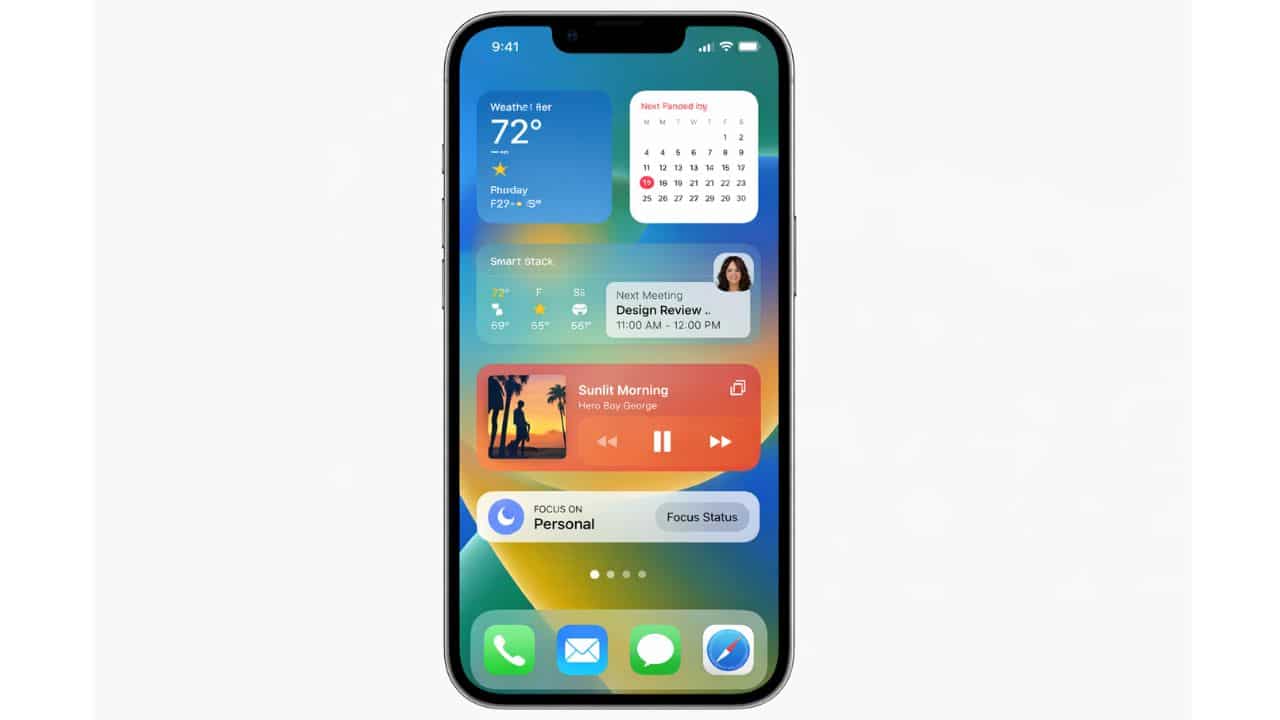
Widgets
Widgets provide glanceable information directly on the Home Screen. Instead of opening apps repeatedly, users can view updates such as weather, calendar events, reminders, or battery status at a glance.
Widgets update intelligently based on usage patterns, ensuring relevant information appears when needed without excessive battery drain.
Focus Mode
Focus Mode helps users control interruptions by filtering notifications and app access based on context. Different focus profiles can be created for work, personal time, sleep, or specific activities.
By reducing unnecessary notifications, Focus Mode improves concentration and mental clarity without disabling important alerts entirely.
Notifications and System Intelligence
Notifications in iOS are designed to inform without overwhelming. The system uses grouping and prioritization to present alerts in a manageable way.
Notification Grouping
iOS automatically groups notifications from the same app, reducing clutter. Time-sensitive alerts remain visible while less urgent notifications are summarized.
Intelligent Interruptions
The system learns user behavior and adjusts notification delivery accordingly. This balance between awareness and distraction is a defining characteristic of iOS.
Siri and Voice Interaction
Siri is the built-in voice assistant in iOS, designed to perform tasks, answer questions, and control system features hands-free.
Siri can:
- Send messages and make calls
- Set reminders and alarms
- Control system settings
- Interact with supported apps
Many Siri requests are processed directly on the device, improving privacy and response speed.
Built-in Communication Apps
iOS includes native communication tools that are tightly integrated with the operating system.
Messages
The Messages app supports text messaging, multimedia sharing, and real-time conversations. It integrates with system features such as notifications, contacts, and privacy controls.
FaceTime
FaceTime provides video and audio calling with high-quality performance. Because it is built into iOS, it benefits from system-level optimizations and security protections.
These communication apps work seamlessly with contacts, call history, and other system services.
Productivity and Organization Tools
iOS includes several built-in apps designed to help users stay organized without relying on third-party tools.
Notes
The Notes app allows users to capture ideas, lists, and documents. It supports text formatting, images, scanning, and secure notes protected by authentication.
Reminders
Reminders integrates with calendars, notifications, and location services. Tasks can be triggered by time, location, or specific actions.
Calendar
The Calendar app centralizes scheduling across personal and professional life. It integrates with reminders, contacts, and system notifications.
Photos and Media Management
Media management is a core strength of iOS. The system organizes photos and videos automatically, reducing the need for manual sorting.
Photos App
The Photos app uses intelligent organization to group images by date, location, and content. Search functionality allows users to find photos using keywords without manual tagging.
Privacy-focused processing ensures sensitive media analysis occurs securely.
Files and Document Handling
The Files app provides centralized access to documents stored locally and in the cloud. Rather than exposing a traditional file system, iOS simplifies file access while maintaining security.
Users can:
- Browse documents by location
- Share files across apps
- Organize folders logically
This approach balances simplicity with functionality.
Safari and Web Features
Safari is the default web browser on iOS, optimized for performance, privacy, and energy efficiency.
Safari includes:
- Intelligent tracking prevention
- Reader mode for distraction-free reading
- Secure password handling
Because Safari is built into iOS, it benefits from deep system integration and consistent updates.
Automation with Shortcuts
Shortcuts is one of the most powerful built-in iOS apps. It allows users to automate tasks across apps and system features.
Examples include:
- Automating daily routines
- Controlling system settings
- Integrating multiple apps into a single action
Shortcuts can be triggered manually, by time, location, or system events.
Accessibility Features Built into iOS
Accessibility is not an afterthought in iOS. Many accessibility features benefit all users, not just those with specific needs.
These features include:
- Voice control
- Assistive touch controls
- Visual and hearing support tools
Because accessibility features are built into the system, they work consistently across apps.
Multitasking and App Switching
iOS supports intuitive multitasking through gesture-based navigation. Switching between apps is fast and fluid, preserving context without consuming unnecessary resources.
The system manages multitasking automatically, ensuring smooth transitions without compromising performance or battery life.
Customization Without Complexity
While iOS does not allow unlimited customization, it offers meaningful personalization options.
Users can:
- Customize Home Screen layouts
- Choose widgets and wallpapers
- Control notification behavior
This balance prevents instability while allowing personal expression.
Built-in Security Across Features
Every built-in iOS feature follows strict privacy and security guidelines. Permissions are enforced consistently, and sensitive data is protected by system-level safeguards.
This unified security model reduces risk compared to relying on multiple third-party apps with varying standards.
Why Built-in Apps Often Replace Third-Party Apps
Many users install third-party apps for tasks already supported by iOS features. Built-in apps offer advantages such as:
- Better system integration
- Lower battery usage
- Stronger privacy protections
Understanding these tools helps users simplify their app ecosystem.
Feature Updates and Long-Term Support
iOS features evolve gradually through system updates. Improvements focus on refinement, performance, and usability rather than disruptive changes.
This approach ensures users benefit from enhancements without needing to relearn core workflows.
Who Benefits Most from iOS Features Knowledge
Understanding iOS features is valuable for:
- Everyday users seeking efficiency
- Professionals managing work on iPhone
- Users reducing app dependency
- Privacy-conscious individuals
Knowledge transforms an iPhone from a simple device into a powerful personal tool.
iOS features and built-in apps form the backbone of the iPhone experience. They are designed to work together seamlessly, providing productivity, communication, automation, and organization without compromising privacy or performance.
By understanding these features, users can reduce app clutter, improve efficiency, and take full advantage of what iOS offers at the system level.
For many tasks, yes. Built-in apps are optimized for system performance, privacy, and reliability.
In many cases, built-in tools like Notes, Reminders, and Shortcuts can fully replace external apps.
System features are designed to be energy-efficient and often consume less power than third-party alternatives.