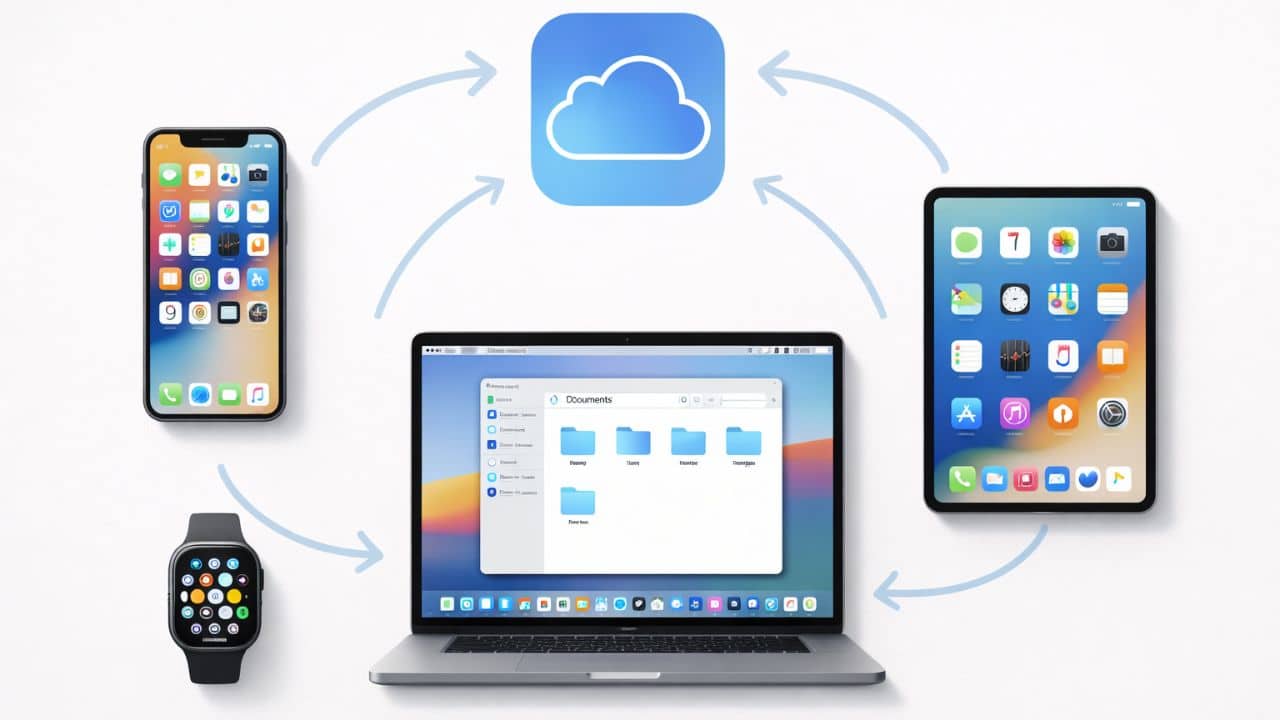
Modern smartphones are no longer isolated devices. They function as central hubs in a broader digital ecosystem that includes computers, tablets, wearables, and cloud services. In the case of iPhone users, iCloud and Apple’s ecosystem integration form the backbone of that connected experience.
iCloud is not simply online storage. It is a synchronization and data continuity system that keeps information consistent across devices. The Apple ecosystem extends this concept further by allowing devices to communicate seamlessly, share tasks, and transfer workflows without friction.
For users in the United States who rely on multiple digital devices throughout the day, understanding how iCloud and ecosystem integration work is essential. When configured properly, these systems reduce duplication, improve productivity, and enhance data security.
This explains how iCloud functions, how data synchronization works, and how Apple’s ecosystem creates a unified user experience across devices.
What Is iCloud?
iCloud is a cloud-based service developed by Apple that stores and synchronizes user data across Apple devices. Unlike traditional cloud storage services that focus primarily on file hosting, iCloud is deeply integrated into the operating system.
iCloud manages:
- Device backups
- Photos and videos
- Contacts and calendars
- Notes and reminders
- App data and system preferences
Instead of manually uploading files, iCloud works automatically in the background, keeping data updated in real time.
How iCloud Synchronization Works
Synchronization is the core function of iCloud. When a user changes data on one device, that change is reflected across all connected devices signed into the same account.
For example:
- Editing a contact on an iPhone updates it on a Mac
- Adding a calendar event appears on all linked devices
- Taking a photo syncs it to other devices
This process reduces redundancy and ensures consistent information across the ecosystem.
iCloud Backup Explained
iCloud Backup protects data by storing a copy of device settings and content in the cloud.
Backups typically include:
- App data
- Device settings
- Home Screen layout
- Messages and attachments
Backups occur automatically when the device is connected to Wi-Fi and charging. This automation ensures protection without user intervention.
iCloud Photos and Media Management
iCloud Photos keeps images and videos synchronized across devices while optimizing local storage.
Storage Optimization
When enabled, full-resolution photos remain in the cloud while optimized versions are stored on the device. This approach balances storage efficiency with accessibility.
Privacy Considerations
Media data stored in iCloud is encrypted during transmission and storage. Privacy protections apply consistently across synced devices.
iCloud Drive and File Storage
iCloud Drive provides file storage and organization capabilities within the Apple ecosystem.
Users can:
- Store documents in folders
- Access files across devices
- Share files securely
Because iCloud Drive integrates with the Files app, users can manage cloud and local storage within a single interface.
Apple ID as the Ecosystem Key
The Apple ID is central to both iCloud and ecosystem integration. It connects devices, manages subscriptions, and controls access to cloud services.
Multi-factor authentication enhances account security, protecting synced data from unauthorized access.
Maintaining Apple ID security is critical for preserving ecosystem integrity.
Device Continuity Features
Continuity features allow Apple devices to work together as a single system.
Handoff
Handoff enables users to begin a task on one device and continue it on another. For example, an email draft started on an iPhone can be finished on a Mac.
Universal Clipboard
Text, images, and links copied on one device can be pasted on another within the ecosystem.
These features reduce workflow interruptions and improve productivity.
AirDrop and Local Device Sharing
AirDrop allows secure file transfers between nearby Apple devices without requiring cloud storage.
Because AirDrop operates locally and uses encryption, it combines convenience with security.
Cross-Device Communication
The Apple ecosystem integrates communication tools across devices.
Users can:
- Send and receive messages across devices
- Answer calls from a connected computer
- Access shared conversation history
This unified communication experience simplifies daily interaction.
Ecosystem and Productivity
The ecosystem approach improves productivity by reducing context switching. Users can move between devices without restarting tasks.
Examples include:
- Viewing synchronized notes
- Accessing shared reminders
- Continuing web browsing sessions
This continuity enhances efficiency.
Security Within the Ecosystem
iCloud and ecosystem integration maintain strong security standards.
Security measures include:
- Encrypted cloud storage
- Secure authentication
- Device-level encryption
Because hardware and software are developed together, security policies apply consistently across the ecosystem.
Managing iCloud Storage
iCloud provides a limited amount of free storage, with additional storage options available. Storage management tools allow users to review what consumes space.
Common storage categories include:
- Backups
- Photos
- Documents
- Messages
Users can adjust backup settings or remove unused data to optimize storage.
iCloud and Data Recovery
In case of device loss or replacement, iCloud simplifies recovery.
After signing into a new device, users can restore data from a cloud backup. This process minimizes downtime and preserves personal information.
Ecosystem Integration with Other Devices
Apple ecosystem integration extends beyond iPhone to include computers, tablets, and wearables.
Mac Integration
Mac computers sync contacts, calendars, and documents with iPhone through iCloud.
iPad Integration
iPad devices share apps, files, and settings through ecosystem continuity.
Wearable Integration
Apple Watch integrates with iPhone for notifications, health tracking, and communication.
These integrations create a unified digital environment.
Privacy and Cloud Data
Cloud services often raise privacy concerns. iCloud addresses this through encryption and strict account protections.
Data synchronization occurs securely, and access is limited to authenticated devices.
Users maintain control over which data categories sync to the cloud.
Offline Access and Reliability
iCloud prioritizes seamless access while maintaining offline functionality. Even without internet connectivity, devices retain locally stored data and sync changes when connectivity returns.
This hybrid model ensures reliability.
Ecosystem Advantages Compared to Standalone Devices
Standalone devices require manual file transfers and app configuration. The Apple ecosystem reduces this friction through automatic synchronization and shared services.
Benefits include:
- Reduced duplication
- Consistent data
- Simplified device setup
Common Misconceptions About iCloud
Some users believe iCloud replaces local storage entirely. In reality, it complements local storage by syncing and backing up data.
Another misconception is that cloud storage is inherently insecure. iCloud uses encryption and authentication safeguards to protect user data.
Who Benefits Most from Ecosystem Integration?
Ecosystem integration is especially valuable for:
- Professionals using multiple devices
- Students balancing mobile and desktop workflows
- Families sharing devices
- Long-term Apple users
Understanding ecosystem features maximizes return on investment across devices.
When iCloud Is Not Enabled
Without iCloud, users must manually transfer data and back up devices. This increases the risk of data loss and reduces workflow continuity.
Enabling iCloud significantly simplifies device management.
The Long-Term Value of Ecosystem Integration
Apple’s ecosystem strategy emphasizes long-term user retention through seamless integration. Once configured, the system requires minimal maintenance.
This stability and continuity contribute to consistent user satisfaction over time.
Yes. Users can enable or disable specific data categories in system settings.
No. An iPhone can function without iCloud, but synchronization and backup features are limited without it.
Yes. iCloud uses encryption and secure authentication to protect stored data.